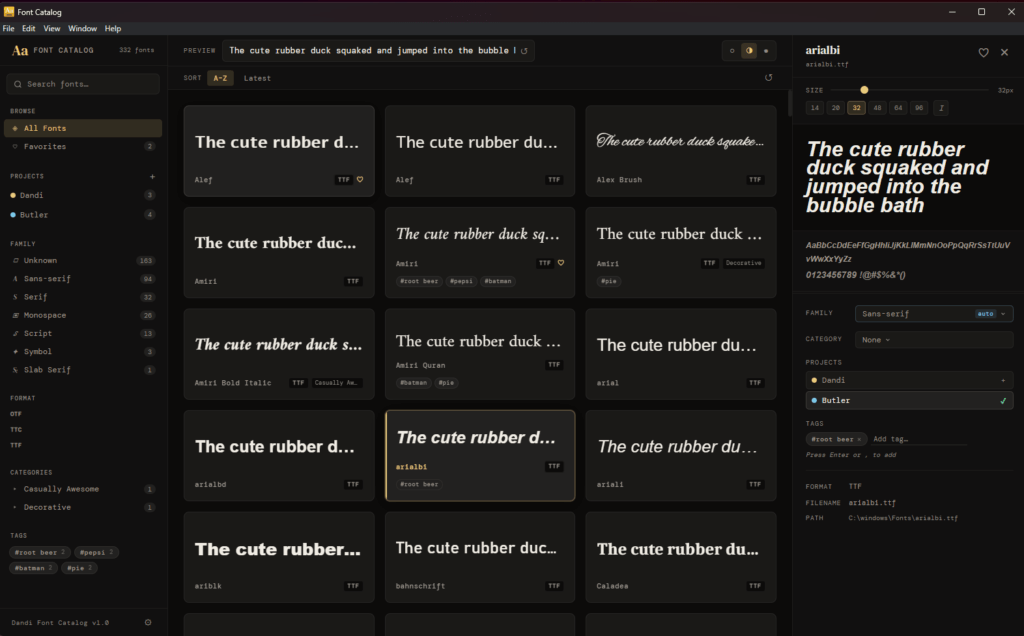
Font Catalog
If you’ve ever worked on a design team, you know the feeling. You’re halfway through a project and you know there’s a perfect font somewhere on your system because you’ve used it before. But, you can’t remember what it’s called. So you open your font folder, scroll through hundreds of files with cryptic names, and hope for the best.
That was us. For years.
We searched for a tool to help us organize this better, but never found one. We wanted to be able to tag fonts, group them by project, and quickly pull up everything we used on a past job. We couldn’t find that, so I built it.
Dandi Font Catalog lets you browse and preview every font on your system, organize them with tags, categories, mark favorites, and group fonts into projects so you always know what you used and where. It scans your system fonts automatically, or you can point it at any folder.
It’s free, it runs on Windows, and it’s the tool I wish I’d had years ago.
Features:
- Scans system fonts and custom folders automatically
- Live preview of any font at any size, with editable preview text
- Filter by family, format, category, or tag
- Mark favorites and organize fonts into named projects
- Add tags and categories to keep your library tidy
- Light, dark, and system theme support